The best 2.1 desktop speaker system depends on your priorities: the Klipsch ProMedia Lumina is best for flexible connectivity and RGB lighting, while the classic Klipsch ProMedia suits listeners who want THX-certified sound. The Logitech Z313 is a straightforward compact option, the Cyber Acoustics CA-3610 offers stronger listed output and bass controls, and the Creative Pebble Plus is a compact USB-powered choice. Compare the key features below before choosing a setup.
| System | Best For | Standout Feature |
|---|---|---|
| Klipsch ProMedia Lumina | Connected gaming and media setups | USB-C, AUX, Bluetooth 5.3, RGB lighting |
| Klipsch ProMedia 2.1 | THX-focused listening | THX certification and 6.5-inch subwoofer |
| Cyber Acoustics CA-3610 | Adjustable desktop audio | 30W RMS and bass control |
| Logitech Z313 | Simple, compact setups | Control pod and 25W RMS output |
| Creative Pebble Plus | Small desks and USB-powered use | Angled drivers and down-firing subwoofer |
Klipsch ProMedia Lumina 2.1 System

Best for: Desktop users who want multiple connection options, customizable desk aesthetics, and a low-profile subwoofer. The ProMedia Lumina supports USB-C, AUX, and Bluetooth 5.3, so it can serve a workstation with wired or wireless sources. Its RGB lighting effects make it a natural match for gaming setups.
The system also features tiltable satellite stands, updated controls, cable management, and an adjustable subwoofer gain knob. Those features make it easier to direct the speakers toward a seated listener and adjust bass without relying solely on source-device controls. Choose this model if flexible connectivity is a priority.
Limitation: The listed features do not specify an output-power figure, so compare it with systems that publish RMS output if that measurement is important to you.
Klipsch ProMedia 2.1 THX System

Best for: Buyers who want a computer speaker setup specified for gaming, movies, and music with THX certification. Klipsch MicroTractrix horn technology is designed to direct sound toward the listener, while the two-way satellites use 3-inch midrange drivers.
The system pairs those satellites with a 6.5-inch side-firing, ported subwoofer. That larger listed subwoofer size may appeal to listeners who prioritize a dedicated bass component for desktop entertainment. Choose it if THX certification and the described horn design matter more than newer connectivity features.
Limitation: The provided feature list does not identify Bluetooth or USB-C inputs, so check the connection details if you need either one.
Cyber Acoustics CA-3610 2.1 System

Best for: Users who want published RMS output, adjustable bass, and a desktop control pod. The CA-3610 is listed at 30W RMS and 62W peak power. Each satellite has dual 2-inch titanium drivers, and its subwoofer is a 5.25-inch down-firing model with a tuned port.
The control pod adjusts volume and bass, and includes a 3.5mm AUX input and headphone jack. The product information lists use with PCs, Macs, laptops, several game systems, tablets, and smartphones when they have a 3.5mm audio connection. Choose this model for physical controls and a range of wired sources.
Limitation: The listed connectivity centers on 3.5mm audio; Bluetooth is not included in the supplied feature details.
Logitech Z313 2.1 Speaker System

Best for: Buyers who want a basic desktop 2.1 arrangement with a compact subwoofer and separate control pod. Logitech lists 25W RMS output, providing a useful published power figure for comparison. The control pod is the system’s standout convenience feature.
Choose the Z313 if you want a simple, space-conscious setup rather than a system promoted around wireless connections or elaborate lighting. Its compact subwoofer may suit a desk area where a larger bass unit would be inconvenient.
Limitation: The supplied product details do not list connection types or independent bass controls, so verify those requirements before buying.
Creative Pebble Plus USB-Powered Speakers
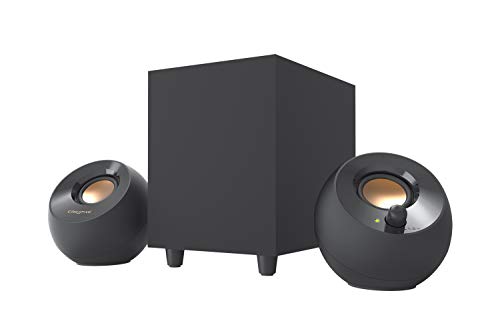
Best for: People with limited desk space who want angled satellite drivers and USB-powered desktop speakers. The two 2-inch midrange drivers tilt upward at 45 degrees, directing sound toward a seated listener. A separate 4-inch down-firing ported subwoofer adds a dedicated low-frequency component.
Creative lists up to 8W RMS in High Gain Mode when used with a 5V, 2A USB adapter. Choose the Pebble Plus when compact speaker placement and a simple USB-powered arrangement are more important than high listed output.
Limitation: The 5V, 2A adapter required for High Gain Mode is not included, according to the product details.
Buying Guide: How To Choose A 2.1 Desktop Speaker System
Which connections do you need?
Check the inputs against the devices you plan to connect. The ProMedia Lumina lists USB-C, AUX, and Bluetooth 5.3. The CA-3610 lists a 3.5mm AUX input and headphone jack. The Creative Pebble Plus is described as USB-powered, but the supplied details do not give a complete input list. Confirm the connection requirements before choosing.
How much bass and desk space do you want?
A 2.1 system adds a separate subwoofer to two satellite speakers. Compare subwoofer size and placement: the ProMedia has a 6.5-inch side-firing model, the CA-3610 has a 5.25-inch down-firing unit, and the Pebble Plus uses a 4-inch down-firing subwoofer. Allow room for the subwoofer and its cables.
Should you compare RMS or peak power?
When available, compare RMS figures with other RMS figures and peak figures with other peak figures; they are different specifications. The Logitech Z313 lists 25W RMS, while the CA-3610 lists 30W RMS and 62W peak. The Pebble Plus lists up to 8W RMS in High Gain Mode with a specified adapter.
Frequently Asked Questions
What does 2.1 mean in a desktop speaker system?
A 2.1 system has two satellite speakers and one subwoofer. The satellites handle stereo audio, while the separate subwoofer provides a dedicated bass component.
Is Bluetooth important for desktop speakers?
Bluetooth is useful when you want to connect compatible devices wirelessly. For a desktop setup, check whether the system also offers the wired input you need for your computer or other equipment.
Can a 2.1 speaker system work for gaming?
Yes. The listed systems are intended for desktop media use, and several product descriptions specifically mention gaming. Check connection type and available desk space to make sure the setup fits your equipment.
Should I choose a larger subwoofer?
A larger listed driver can be a useful comparison point, but it does not tell the whole story of sound performance. Consider subwoofer placement, available space, and the system’s other specifications alongside driver size.